



3.9
Free
CheatSheet
Free keyboard shortcut utility

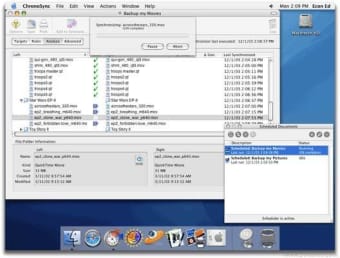
ChronoSync is an easy to use data management tool that allows you to efficiently synchronize files and folders from one disk location to another.
Using the document-based interface, you can easily identify a group of files, specify a destination, then schedule the action to occur as often as necessary.
Perform trial syncs and compare files so you always know the status of every file. Filter out specific files and folders using rules and exclusions.
Archive deleted files in case you need to restore an older version.
ChronoSync monitors the state of all your files so it only copies files that have been changed, keeping your synchronization time to a minimum.
A disk management companion

A reliable disk copying program for Mac

Backup Simply With File Cloning
Free
Mac
macOS 10.15
3.6K
102.70 MB
Have you tried ChronoSync? Be the first to leave your opinion!
Add reviewA disk management companion
A reliable disk copying program for Mac
Backup Simply With File Cloning

A full version program for mac, by VADIM ZYBIN

Advanced Software Package to Back-Up Important Data

Sync your Mac with your Android and iOS devices with ease

Syncing Files Was Never So Uncomplicated

Monitor CPU Speed with Hot Application
Overview of Mac OS X 10.6.5

Comprehensive Font Editing with Glyphs

Connect Your Mac to Pretty Much Anything That’s Serial Port-Equipped

Comprehensive Tool for INAV Flight Control

Effective Break Management Tool for Mac

ElectronMail: A Desktop Client for ProtonMail

Efficient Management with Bob Wallet

Secure Your Cryptocurrency with BitBox

Kotlin Native: A Powerful Tool for Kotlin Developers

Enhance Your English Writing with Ludwig

Streamline Video Editing with Recut